WhatsApp Messenger vs WhatsApp Business vs WhatsApp Business API: Complete Guide for Businesses

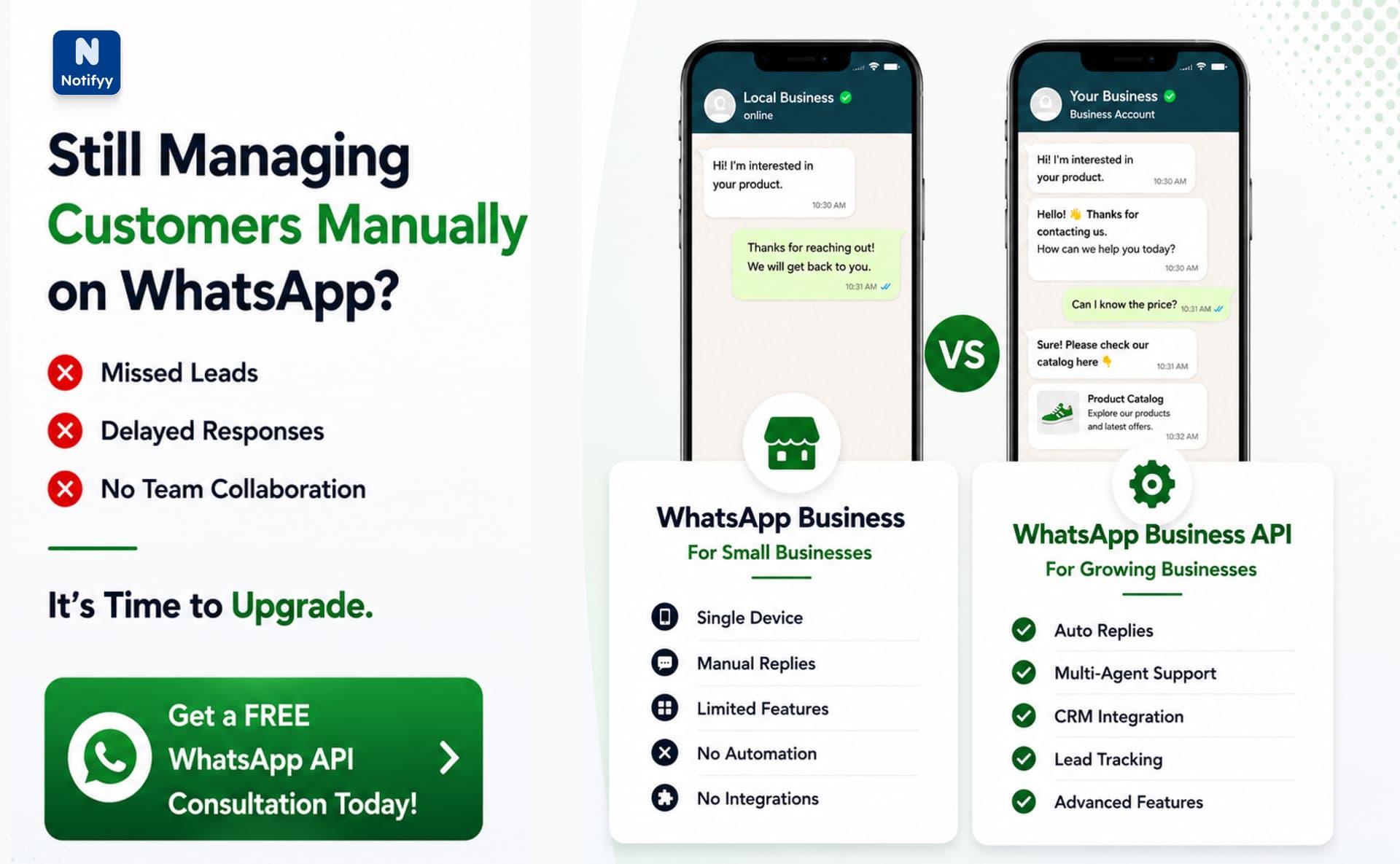
Most businesses start their communication journey using WhatsApp Messenger because it is simple, fast, and already part of daily life.
At the beginning, it works perfectly for handling customer conversations. But as the business grows, managing chats manually becomes difficult. Messages start piling up, responses get delayed, and tracking customers becomes messy.
This is where businesses begin exploring structured solutions like WhatsApp Business and more advanced systems like the WhatsApp Business API.
WhatsApp vs WhatsApp Business vs WhatsApp Business API: An Overview
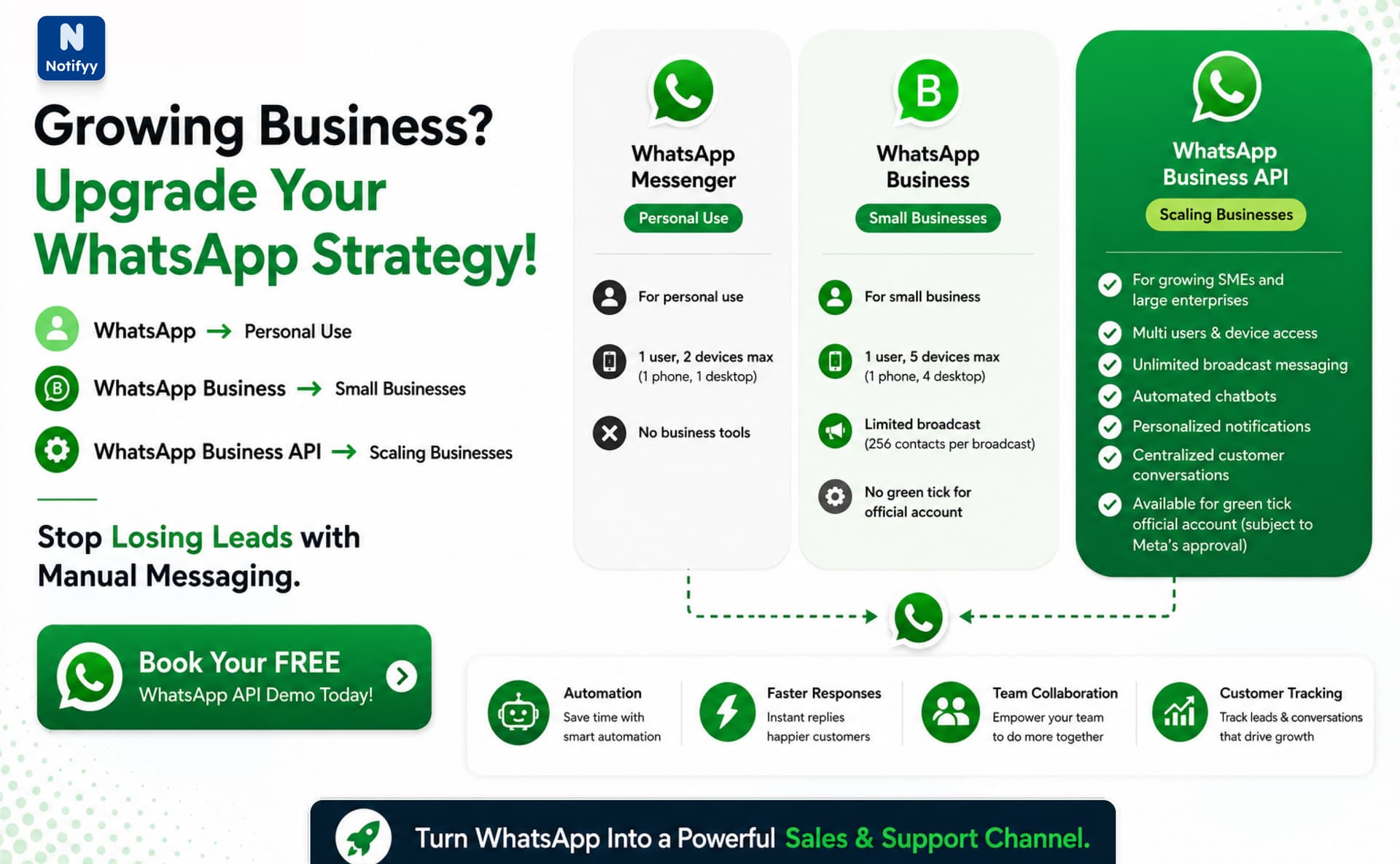
WhatsApp Messenger
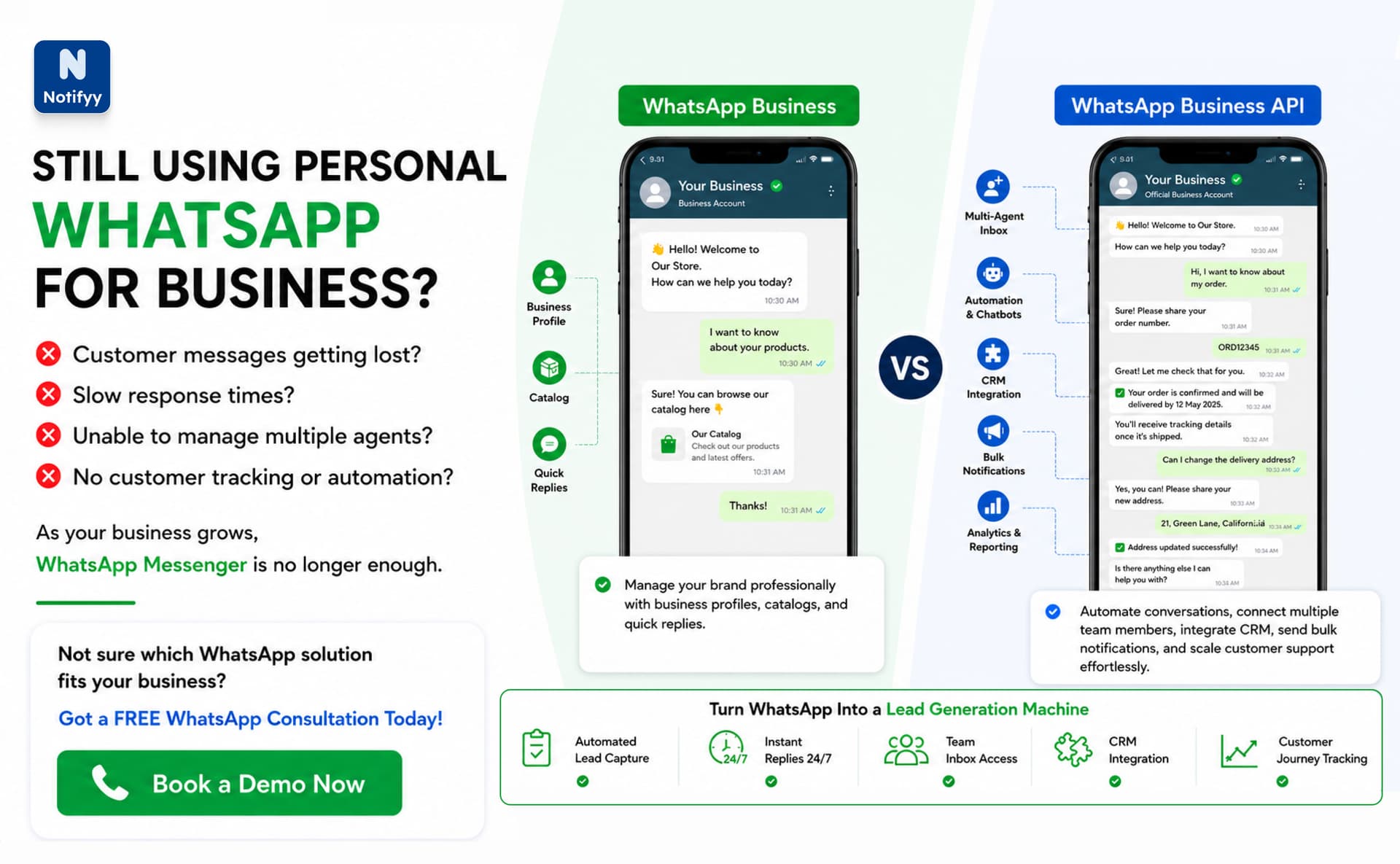
WhatsApp Messenger is designed for personal communication.
It allows messaging, calls, group chats, and file sharing. However, it does not provide any business-specific features like automation, customer tracking, or team management.
It works well for individuals but becomes inefficient for managing business conversations.
WhatsApp Business App
WhatsApp Business is built for small businesses that want a slightly more professional setup.
It includes features like business profiles, product catalogs, quick replies, and greeting messages.
However, it still has limitations such as single-device usage, limited automation, and no advanced team collaboration features. It is suitable for small-scale operations but not for growth-stage businesses.
WhatsApp Business API
WhatsApp Business API is designed for scaling businesses that need automation, multi-agent support, and integration with business systems.
Unlike the app versions, it is not a standalone app. It works through platforms and service providers that connect WhatsApp with CRM systems, automation tools, and customer support dashboards.
This makes it suitable for handling large volumes of customer interactions efficiently.
Why Businesses Use WhatsApp Business API
As businesses grow, customer communication becomes more complex. This is where the WhatsApp Business API becomes important.
It helps businesses manage conversations in a structured way instead of relying on manual replies. Teams can handle multiple chats at once, assign conversations, and reduce response time.
It also supports automation, which reduces workload and improves customer experience.
Many businesses adopt it when they start losing leads due to delayed responses or unorganized messaging.
How WhatsApp Business API Works
The whatsapp api for business works by connecting WhatsApp with external business systems through approved providers.
Instead of using a regular mobile app, businesses access WhatsApp through dashboards or CRM systems that centralize all customer conversations.
When a customer sends a message, it is routed into a shared inbox where teams can respond, assign conversations, and track every interaction. This keeps communication organized even when message volume is high.
Businesses can also run campaigns, send updates, and manage customer groups efficiently. These systems support automation, segmentation, and bulk messaging to improve engagement and response speed.
This setup allows companies to handle customer communication at scale without relying on manual replies or a single device.
WhatsApp Business API as a Complete Business Channel
The WhatsApp Business API is a completely different way of using WhatsApp for business.
It is not something you install like a normal app. Instead, it works as a backend system that connects WhatsApp with business platforms like Notifyy.
With this setup, WhatsApp becomes a full business command center where communication, campaigns, automation, and customer management all happen in one place.
At this stage, businesses are no longer just replying to customers. They are actively managing relationships, running campaigns, and building structured communication systems that scale with growth.
What Notifyy Adds on Top of WhatsApp Business API
With Notifyy, the WhatsApp Business API becomes more powerful and practical for everyday use.
Instead of juggling multiple tools, everything is combined into one system designed for teams, automation, and marketing.
Verified Business Identity
Trust plays a major role in communication. With Notifyy, businesses can get verified profiles that show a blue checkmark next to their name.
This instantly improves credibility and increases customer confidence before they even open the message.
WhatsApp Templates
Businesses often send repeated messages such as order updates, payment confirmations, and alerts.
WhatsApp Templates help structure these messages in a reusable format that ensures consistency and reliability in communication.
WhatsApp Campaigns
Businesses can run targeted campaigns directly on WhatsApp.
These can include product launches, promotional offers, re-engagement messages, or seasonal updates, helping brands reach the right audience with relevant messaging.
Bulk Messaging
Bulk messaging allows businesses to communicate with large customer groups at once while maintaining proper tracking and structured delivery.
This is useful for announcements, updates, and time-sensitive communication.
No-Code Chat Automation
With Notifyy, businesses can build automated chat flows without any technical setup.
These workflows can answer FAQs, collect customer details, qualify leads, and guide users through common processes automatically.
This ensures instant responses and reduces manual workload.
Shared Team Inbox
All customer conversations are centralized in a shared inbox where teams can assign chats, collaborate, and respond efficiently.
This removes confusion and ensures no customer message is missed.
Built-in CRM View
All customer data, conversations, tags, and history are stored in one place.
This helps businesses understand customer behavior and manage follow-ups more effectively.
Analytics and Insights
Businesses can track message delivery, response times, campaign performance, and engagement levels.
This helps improve communication strategy based on real data instead of assumptions.
Case Study
A growing e-commerce business initially used WhatsApp Messenger for customer support.
At first, one person handled all customer queries manually. As orders increased, response delays began affecting sales and customer satisfaction.
The business then moved to WhatsApp Business, which improved communication slightly with quick replies and product catalogs. However, limitations like single-device usage and lack of automation still created challenges.
Finally, they adopted the WhatsApp Business API. With automation, multiple agents, and structured workflows, they were able to:
- Reduce response time significantly
- Handle more customer queries simultaneously
- Improve lead conversion
- Automate order updates and notifications
This transition helped them scale without increasing manual workload.
Conclusion
Choosing the right WhatsApp solution depends on business stage and communication needs.
WhatsApp Messenger is best for personal use. WhatsApp Business is suitable for small businesses. WhatsApp Business API is ideal for growing and scaling businesses.
As communication volume increases, businesses naturally move toward structured systems.
Using tools like whatsapp marketing software helps businesses manage communication efficiently, improve response time, and scale without losing customers.
Ready to grow your sales with WhatsApp?
Start managing contacts, running campaigns, and automating workflows from one platform.